The Summer Blogging Challenge

Accepted a summer blogging challenge. 

I decided to accept a challenge from Melinda Miller to blog twice a week this summer.

First, I thought I would give an update as to where I am and what I am doing.

In September of last year, I accepted a position as an assistant principal in an elementary school in my district. This is where I want to be, and it is truly amazing. I am so glad to be here. I didn't think that I would like elementary school as much as I do, but I really enjoy it. Being a middle school teacher, I didn't think that I would enjoy all these little kids, but they are a lot of fun. I do miss the conversations about ideas that you have with older students (which was still very infrequent in the middle school).

I have known for a long time that I wanted to be a school administrator. Here are the things that I love most about my job, in no particular order:


  1. Being around kids again. They are fun, and I love seeing them learn. 
  2. Helping adults and kids solve problems. We all have problems, and it doesn't take a genius to solve it, but it does take a listening ear. 
  3. Building a culture. This will happen more when I am a principal on my own, but my principal is great and shares my philosophy, so it is a ton of fun.
  4. Every day is new and exciting. One day could be filled with a lot of discipline issues, another day with a lot of teacher observations, another day with a lot of counseling with teachers or kids, another day immersed in data and interpreting and analyzing it, and another day can be a mixture of all that. I love that things change all the time. 
  5. A new perspective. Elementary school is the foundation. It is where immense learning and changes happen. Kindergartners go from having baby-fat chubby faces to losing that baby-fat while they are learning to read. It is exciting.
  6. Family atmosphere. With a smaller faculty, and fewer kids, we feel much for familial than in a middle school. That is neat to experience. I really care about these teachers and students. I feel like I still have a chance to make a difference in their lives. 
There is a lot more that I love about being here, but those are the big things for now. Some of the challenges I have faced, again, in no particular order:
  1. I still don't get elementary school. There are things that happen that I just don't pay much attention to, and I need to start getting with the program. There are other things that I notice that some elementary people don't notice, so it is a good perspective, but challenging nonetheless.
  2. Curriculum. I am learning, but it takes time to figure out literacy and how kids should learn. I don't know where I would be if I weren't in EBL last year. I learned so much there, and I am so grateful I had that opportunity to learn. 
There are more challenges, as well, but those are the big ones. 

Have a Good Life.

The Paperless Principal, Part 1: Witness Statements

Twitter version: Use ScanSnap, OCR, Hazel, and Boxcar to digitize, notify, and sort all witness statements from students.

Why Go Paperless?

One thing I have learned about myself is that I get overwhelmed and bothered by big stacks of paper on my desk. I don't like having people come into my office when there is all that mess, and I don't feel like I can do anything. I also like having access to the things that I need somewhere on my iOS devices, if I am not by my computer.

I recently picked up the great iBook by David Sparks called Paperless. It is a great read, and Sparks goes into great detail about how to be paperless. He gives a lot of great tips and walks through many different types of software in screencast format. The screencasts are especially beneficial because I like to try things out, and the screencasts are targeted on specific tasks and show how it looks doing that task in the different programs. It helps seeing what you are reading.

He gives some good tips for naming conventions, and recommends three tips: 1. Assume Senility 2. Always put the date first 3. Always use lower-case. Here are our naming conventions as they stand right now. That is subject to change.

Old Workflow

  1. Secretaries collect witness statements.
  2. They put them in my box.
  3. I take them from my box and go through them.
  4. I put them in a pile on my desk, or in my to do box on the desk. 
  5. I don't get around to all of them, and I just keep shuffling them from one pile to another. 
  6. When I do finish them, I write the incident number on the witness statements and send them to the principal's office to be filed. 
  7. Occasionally, we need to look at old witness statements. We've needed to find old statements about 10 times this year. So, more than once per month, which means we need a good system to help us find old statements. 
Here are the problems I have with my current workflow (and how I would hope this new workflow solves them):
  • I have to be in my office to deal with any problems (or carry around a big stack of papers). I am often not in my office. Friday, for example, I set my stuff down in my office, and returned once during the day for a couple minutes, and then packed my stuff up at the end of the day. Solution: Digitizing them allows them to be accessible on my phone without having to be in my office. 
  • I end up with piles of witness statements, some of which could have been handled in two minutes by their teacher. Solution: Piles are gone, and I can email the teachers right after reading the statement and forward it on to the them. 
  • My principal certainly doesn't have time to file all the witness statements (neither do any of the secretaries). Solution: Automatic filing, so even if I don't personally deal with the situation, we have it on record that it was reported and we can at least state what was done. 
  • When a parent or student says they have turned in statements about a recurring problem, it would be really beneficial to review them and ensure that we made a correct response the first time. Also, when we need to send a student on to a district-level hearing, we have an easier time collecting documentation relating to that student's history. Solution: Having all the statements in one folder lets me know that they have (or haven't) complained about something before, and even if I didn't deal with it, I can see their history.

New Workflow

Simple idea version

  1. Scan witness statements.
  2. I get notified and deal with the problem.
  3. I rename the file once it is dealt with or solved.

How the simple idea version actually works

  1. Secretaries usually collect witness statements.
  2. Secretary puts witness statements that I need to review in the scanner (or sends them right to the teacher if she knows they can deal with it).
  3. Statements are OCR'd as they go through.
  4. Hazel reads contents and when it sees "WITNESS STATEMENT" in the document, it renames it to "witness statement.pdf" and sends it through dropbox to my computer. 
  5. My action folder has a Hazel rule that renames files called "witness statement.pdf" to "to do 2012-05-18 witness statement.pdf".
  6. I get a Growl notification on my iPhone (through boxcar) that says "Work - to do 2012-05-18 witness statement".
  7. Then I open my dropbox folder on my phone and see that I have a witness statement in that folder. I can pull the kids out right away, or wait for a bit, depending on the severity. 
  8. When I deal with the problem, I rename the file using Snippets by Conceited Software. The snippet I use is "/wit" which expands to "2012-05-18 witness statement - ##firstname lastname##" where there is a fill-in form for the student's first and last name. (before renaming, I split the multi-page PDF with all the witness statements into a bunch of single-page PDFs and rename them all using the above snippet.)
  9. Once the file is renamed, that means it is completed and logged in our student information system. 
  10. Also, once the file is renamed, Hazel sees the new name that starts with the year, and moves it to the Student Folders folder where...
  11. There is another Hazel rule which sorts it into a subfolder which is alphabetized by student last name(!)!
  12. Then, I have a year's worth (or more) file of all statements by all students that have filled one out!
That is a lot of work to get to this point. Why do it? 

I'll highlight some of the steps of my workflow, as they are pretty amazing. 

Scanning

We use a Fujitsu ScanSnap S1500M (though all their scanners are pretty amazing from what I have heard). The software can do OCR as it scans, which is what we have it set up to do, and it will also add keywords to a PDF based on highlighted words in the document, which is something I will work on for some other workflows. The scanner is fast, and slick. It rocks. I haven't had any problems with OCR, even with our nonstandard font on our Think Time sheets. My favorite things about this scanner:

  • Scans both sides of the document
  • Automatically deletes a blank back page
  • OCR on all files
  • Automatically adjusts page to correct orientation

ScanSnap Preferences. Convert to Searchable PDF means OCR.

Hazel Rules

Search contents for the words WITNESS STATEMENT and MUST USE PEN TO COMPLETE (which are easily OCRized phrases that are on our witness statements and not much else), then rename it as "witness statement" in the scanned folder. 

Here are the "sort into subfolders" rules (I use Hazel 3) that are run when another Hazel rule sends files to my "Student Folders" folder.  These are all the rules I have set up for that folder, but I'll focus on the witness statement rule, and the rest build off of that. Somehow I found this cool Hazel rule for renaming and automatically sorting files into subfolders, even if you don't have the folder they will end up in already created, which was a new concept for me. I didn't download his examples, because what I needed was different enough that I didn't want to just edit. The key is custom tokens. Use custom tokens and it will be able to use what work you have done to simplify your life later. 
Custom Tokens is the key

Boxcar/Growl

One of my favorite parts of this workflow is that I can use my iPhone or iPad to check out the witness statements. When a new witness statement is added to my action folder, a Hazel rule sends a growl notification (I am not using the app store version of growl) on my computer which stays up until I dismiss it (to ensure that I don't miss any witness statements). I also use Boxcar to send that same notification to my phone. So, on my phone and on my computer are notifications that I have something to deal with. 

Using Files Later

Once I have all the witness statements in the computer, they are in my "Student Folders" folder, organized neatly by student. That is pretty rad, but sometimes I need them. So, I made a smart folder in the finder, which you can see below. This smart folder is called "2012 witness statements" and at the end of the year, I will be able to archive all those and save it is as one large ZIP file that will have every witness statement we collected this year in a neat space. 

Continued Obstacles

  • Witness statements from one event are not grouped together, so each student's folder only has his side of the story. I am not sure if the date is the best way to go about organizing them, but right now, it seems like the best (easiest) way. 
  • Not all events worth recording and documenting come with a witness statement, and students aren't always able to fill them out. 

Plain Talk about Reading Conference: Anita Archer


Last week, I had the opportunity to attend the Plain Talk about Reading Conference in New Orleans. It was a good conference and there was a lot of good information. Here are my notes from the first session with Anita Archer called "Getting them all engaged: Inclusive, active participation". I did some recordings of it that are included with the zip file. There is a PDF that has my notes. 

Twitter version of this session: 
When we want students to discuss things, we should have sentence starters for them. We want them to discuss, not just state what the "right" answer is. They can be like this:
1. I disagree with you, I think...
2. I disagree with you, because...
3. I agree with you, but I also think...
4. I agree with you, because…
This gives kids an opportunity to discuss things, and not just give a yes or no response. It also opens the door for you to shove some academic language in there when they are discussing. 

See the PDF for the rest of the notes on this session. And, I was sitting in the front row, so I got to see Anita up close. Very close. She kept standing next to me. 


The audio recordings start at these spots in the PDF: 
1st recording: I. A. Active Participation
2nd recording: I. A. c. Gentle Redo
3rd recording: I. B. d. Give students a sentence starter
4th recording: I. C. Less Desirable Practices
5th recording: I. E. b. Why is it better to write on Slates?
6th recording: I. F. a. Why are response cards great? Limited set of responses (increases chance of success)

Have a Good Life.

P.S. For those keeping track at home, I used the app called Notability to take these notes. It is by far my favorite note taking app so far.  


Salt Lake City Bike Tour, Take 2

I did the bike tour again. I wasn't going to do it, but a good friend at work said he was going to, and he is a better rider than I, so I thought it would be a good challenge.

Turns out, we weren't able to meet up, so I couldn't ride with him, but I finished about 15 minutes after him.

The ride was pretty good. I didn't spend too much time drafting other riders. But I did hitch on a couple trains here and there.

The ride was a little bit different than last year, but not enough for it to be a big deal.

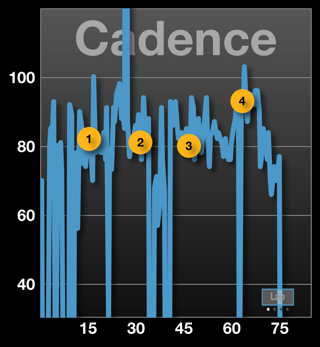
This year, I had a heart rate monitor and a speed and cadence sensor attached to me and my bike. I really like having those; they make the ride much more enjoyable. Since I didn't have to worry about much, I kept the screen on my heart rate graph, which was pretty cool to see.

I didn't focus on my speed at all, which is good for me because it usually makes me go slower.

I did get stopped part way through the ride as my chain fell off as I was shifting. That is always a bummer!

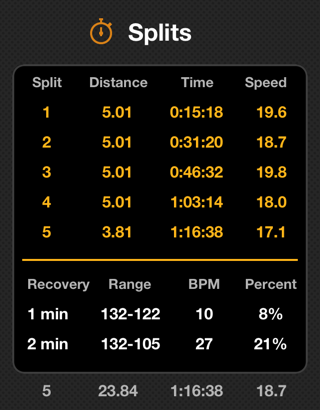
Last year it took me 1 hour and 20 minutes to ride 23.87 miles. This year, however, it took me 1 hour and 16 minutes to ride 23.84 miles. My average last year was 17.9 and I wanted to hit 18 mph average and I got 18.7 mph average. I was pretty stoked about that.

I did not run out of energy, despite not eating any carbs. That was cool, too.


What Do You Want to Be When You Grow Up?

I had a chat with one of our really great kids at my school today. While we were talking, I asked him what he wants to be when he grows up. He said, "When I grow up, I just want to be a good dad and be there for my family."

This kid gets it. He knows what is important in life. What is really important. It is not about money, careers, fame, or anything else. It is about being a good dad who is there for his family.

This kid is going to Have a Good Life.

I Learned That in Primary

Do you ever hear some popular piece of wisdom and think, "Duh! I learned that in Primary"? I do. All the time. I read a lot of research for work. It seems that most research is common sense and if we just think about it for a couple minutes, we could come to the same conclusion. We can usually come to that conclusion because we were already taught it, by our primary teachers.

My point is, Jesus is the source of all truth, and so new research will almost always lead back to His gospel. That is the point of learnedinprimary.com. There, I take the research that I am reading, and I apply it to lessons that I have already learned, long ago.

Go on over and check it out. Let me know what you think. I publish a new post every Monday. If you have any requests, let me know.

Have a Good Life.

Take your daughter to work day

I took my daughter with me to work today for "Take Your Daughter to Work Day". She is 4 and loves preschool and can't wait to go to Kindergarten.

She had a great time at work with me and loved the attention she got from the students and loved being with big kids. She did really well, and we even got to ride the bus in the afternoon.

What really amazed me was how the other students interacted with her. Being the Assistant Principal, I get to deal with a lot of kids who struggle in various ways. Those kids were exceptional when they were around her, without fail. It was fascinating to see how they changed when she was there. I really enjoyed seeing how they were kind to her, compassionate and very friendly. One fifth grader even got her set up on a web site where she could play games. He took great care to make sure that she was on a game that was appropriate for her. I was really proud of my "other" kids for treating my kid so well.

I don't know exactly why they were so good to her, but they were, and it really made me remember that they are great little people that I get to work with every day.