Acer Aspire One
Sunday, January 25, 2009 by jethrojones
Acer is offering a 30-day trial of a desktop and a notebook to K12 schools. They are offering these trials, with the hopes that the schools that try them will purchase labs for their schools. I signed up and within a week, I got a call from their sales department and by the end of the week, I had the notebook I ordered in my hot little hands.
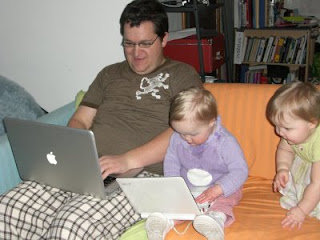
The notebook is the Acer Aspire One Netbook. These are the specs:
• Intel® Atom™ Processor N270
(512KB L2 cache, 1.60GHz, 533MHz FSB)
• Genuine Windows® XP Home Edition
• 1GB DDR2 533 SDRAM
• 160GB hard drive
• Multi-in-one card reader
• SD Card reader
• 8.9" WSVGA (1024 x 600) TFT display,
Acer CrystalBrite Technology
• Intel® Graphics Media Accelerator 950
• 802.11b/g WLAN, 10/100 LAN, webcam
I was actually surprised that they sent this to me, because it looks like their best model. It has the same processor speed of our Dell notebook that we bought a few years ago, but this model has a built-in webcam, and a multi-in-one card reader.
Software
So far, this computer is awesome. I really like it. Windows XP does have its drawbacks, but it is pretty responsive and with the addition of PortableApps, it is even better. PortableApps are portable, free, open-source programs that are intended to be used on small flash drives. They keep all your data and history and everything on the stick, so that you can pretty much use them on any Windows computer. They are designed to be lightweight, easy on the resources, and fast. So far, they have delivered. I downloaded the non-portable version of Firefox 3 and it ran much slower than the portable version. There was a noticable difference.
The netbook comes with an eRecovery program which will reset the computer to the factory default. As much as I have needed to reformat my other PCs in the past, this is a great feature, one that I am sure other companies have as well, but that I have never used. It works (I tried it, just for fun). Other than that, it comes with the standard schtick for XP computers.
I downloaded iTunes on it, and that ran pretty slow. The videos were choppy. We went for a little drive yesterday and set it up for the girls to watch a movie. After downloading VLC and using that to watch it, the video was smooth and the audio was just fine. VLC allows you to turn the volume up to 200%, which is a good thing because the speakers are pretty weak. It is not bad if you are alone, but as I was trying to watch a YouTube video with my two girls screaming to be able to play with the computer, it just wasn't even close. They were too quiet and too tinny.
Hardware
There are two things that I really don't like about it. First, the mouse buttons are on either side of the trackpad. Wicked annoying. The redeeming quality for the trackpad is that it has a flavor of my MacBook Pro's multi-touch trackpad. I can two-scroll, tap and drag, and right-click, all on the trackpad, without having to touch the buttons. It is still pretty fickle when it wants to wrk, and that is kind of annoying. I have gotten very used to not having any mouse buttons and I am surprised how much I like my freedom from buttons.
The second big hardware/design flaw is that down near the hinge on the screen and the base, there are two sharp points on each side. Not cool. I catch my pants, fingers, and blankets on those all the time.

The keyboard rocks! I thought that it would be very hard to get used to, but it is just the right size, the keys hit just right, and it feels very comfortable considering its small size. The webcam is not perfect, but it is good enough for a quick Gmail video chat, but I don't think the computer would handle much more advanced video conferencing. HD YouTube videos don't play well on here, so video conferencing would really take a toll.
I did record some video in Windows Movie Maker of my daughters playing around, and it worked fine, so I think the camera would be good for most uses.
I wonder if I could upgrade the RAM to 2GB and if that would make a difference.
When the 30-day trial period is over, I have the option to buy the netbook for only $199. That is a great deal for a great computer. If you have the opportunity to sign up for the seed program, you really should go for it. In the next couple days, I hope to get a post up about using this as a 1-1 device, a purpose for which I think it is almost perfectly suited.
Have a Good Life.

The notebook is the Acer Aspire One Netbook. These are the specs:
• Intel® Atom™ Processor N270
(512KB L2 cache, 1.60GHz, 533MHz FSB)
• Genuine Windows® XP Home Edition
• 1GB DDR2 533 SDRAM
• 160GB hard drive
• Multi-in-one card reader
• SD Card reader
• 8.9" WSVGA (1024 x 600) TFT display,
Acer CrystalBrite Technology
• Intel® Graphics Media Accelerator 950
• 802.11b/g WLAN, 10/100 LAN, webcam
I was actually surprised that they sent this to me, because it looks like their best model. It has the same processor speed of our Dell notebook that we bought a few years ago, but this model has a built-in webcam, and a multi-in-one card reader.
Software
So far, this computer is awesome. I really like it. Windows XP does have its drawbacks, but it is pretty responsive and with the addition of PortableApps, it is even better. PortableApps are portable, free, open-source programs that are intended to be used on small flash drives. They keep all your data and history and everything on the stick, so that you can pretty much use them on any Windows computer. They are designed to be lightweight, easy on the resources, and fast. So far, they have delivered. I downloaded the non-portable version of Firefox 3 and it ran much slower than the portable version. There was a noticable difference.
The netbook comes with an eRecovery program which will reset the computer to the factory default. As much as I have needed to reformat my other PCs in the past, this is a great feature, one that I am sure other companies have as well, but that I have never used. It works (I tried it, just for fun). Other than that, it comes with the standard schtick for XP computers.
I downloaded iTunes on it, and that ran pretty slow. The videos were choppy. We went for a little drive yesterday and set it up for the girls to watch a movie. After downloading VLC and using that to watch it, the video was smooth and the audio was just fine. VLC allows you to turn the volume up to 200%, which is a good thing because the speakers are pretty weak. It is not bad if you are alone, but as I was trying to watch a YouTube video with my two girls screaming to be able to play with the computer, it just wasn't even close. They were too quiet and too tinny.
Hardware
There are two things that I really don't like about it. First, the mouse buttons are on either side of the trackpad. Wicked annoying. The redeeming quality for the trackpad is that it has a flavor of my MacBook Pro's multi-touch trackpad. I can two-scroll, tap and drag, and right-click, all on the trackpad, without having to touch the buttons. It is still pretty fickle when it wants to wrk, and that is kind of annoying. I have gotten very used to not having any mouse buttons and I am surprised how much I like my freedom from buttons.
The second big hardware/design flaw is that down near the hinge on the screen and the base, there are two sharp points on each side. Not cool. I catch my pants, fingers, and blankets on those all the time.

The keyboard rocks! I thought that it would be very hard to get used to, but it is just the right size, the keys hit just right, and it feels very comfortable considering its small size. The webcam is not perfect, but it is good enough for a quick Gmail video chat, but I don't think the computer would handle much more advanced video conferencing. HD YouTube videos don't play well on here, so video conferencing would really take a toll.
I did record some video in Windows Movie Maker of my daughters playing around, and it worked fine, so I think the camera would be good for most uses.
I wonder if I could upgrade the RAM to 2GB and if that would make a difference.
When the 30-day trial period is over, I have the option to buy the netbook for only $199. That is a great deal for a great computer. If you have the opportunity to sign up for the seed program, you really should go for it. In the next couple days, I hope to get a post up about using this as a 1-1 device, a purpose for which I think it is almost perfectly suited.
Have a Good Life.
Posted in:
Aspire1,
computers,
netbook,
review,
technology
|
2
comments
|
|


 Facebook/Jethro
 Linkedin/Jethro Jones
 Twitter/jethrojones
 YouTube/mrjoneseng
 Del.icio.us/jethrojones
 Wikipedia/mrjoneseng
 Skype/jethro.jones
 AIM/mrjonesed
 GMail/Jethro
 Pownce/jethrojones